
You send crypto from one wallet to another and the balance doesn't update right away. Or a friend claims a transfer never arrived. Or your accountant asks you to prove that a specific coin sat in your wallet for more than a year before you sold it. In every one of these situations, the fastest way to get a straight answer is to look the transaction up yourself on a blockchain explorer.
A blockchain explorer turns the raw, technical data recorded on a blockchain into something you can actually read in a browser. This guide explains what a blockchain explorer is, walks through exactly how to look up a wallet address or transaction step by step, lists the explorers worth knowing for each major chain, and covers the one thing most explorer guides skip: why this free tool matters for crypto tax reporting.
Key Takeaways
- A blockchain explorer is a search engine for a blockchain: it lets you look up transactions, wallet addresses, blocks, and smart contracts using a public browser interface.
- You don't need to run your own node: explorers connect to the network for you and display the data in a readable format.
- Every major chain has its own explorer: from Etherscan for Ethereum to Mempool.space for Bitcoin, plus multi-chain tools like Blockchair.
- Looking up a transaction takes two steps: paste a transaction hash or wallet address into the search bar, then read the result screen.
- Explorers are a genuine tax tool: they let you verify transaction dates, cross-check exchange data, and document the source of your crypto, though they don't calculate gains or generate tax reports for you.
What Is a Blockchain Explorer? (Simply Explained)
A blockchain explorer is a web-based tool that lets you search, view, and analyze the data recorded on a public blockchain network. Think of it as a browser and search engine built for on-chain data instead of websites: instead of typing in a URL, you paste in a wallet address, transaction hash, or block number and see exactly what's recorded on the chain.
Chainlink frames it the same way, describing a blockchain explorer as "a search engine for a blockchain network" and "a web-based application that allows users to search, navigate, and analyze the public ledger." You do not need to install software or run your own node to use one.
How Does a Blockchain Explorer Work?
An explorer sits between you and the raw network, pulling data straight from the blockchain and organizing it into a page you can browse without any technical setup. That process breaks down into two parts: how the explorer gets the data, and how it makes that data searchable.
Nodes, indexers, and the search bar
A blockchain itself is just a distributed ledger spread across a global network of computers, and reading it directly would require running your own full node and querying it manually. An explorer removes that barrier: the software connects to blockchain nodes through Application Programming Interfaces (APIs) and Remote Procedure Calls (RPCs), continuously listening for new blocks as they're added to the chain.
When a new block appears, the explorer extracts the raw data, block heights, transaction hashes, sender and receiver addresses, and timestamps, then indexes it into a searchable database so it loads instantly when you type a query into the search bar. This indexing step is what separates an explorer from the raw blockchain: the underlying ledger is public either way, but the explorer's database is what makes it searchable in seconds instead of hours.
What information can you look up?
Once the data is indexed, an explorer's search bar accepts several types of input and returns a dedicated results page for each:
- Transactions: paste a transaction hash to see its status, the amount transferred, and the addresses involved.
- Wallet addresses: paste an address to see its current balance and full transaction history.
- Blocks: look up a block by its number or hash to see every transaction it contains.
- Smart contracts: view a smart contract's code, token balances, and every function call made against it.
- Tokens and NFTs: track fungible token transfers and NFT ownership history, including transfers made through DeFi protocols and decentralized exchanges.
Beyond simple transfers, most explorers also track fungible token movement, NFT transfers, and increasingly, tokenized real-world assets, and the more advanced ones include dedicated sections for smart contract code and activity.
Tired of checking every wallet by hand?
CoinTracking imports your transactions from over 400 exchanges and wallets automatically, so you don't have to paste every address into an explorer one at a time.
How to Use a Blockchain Explorer to Look Up a Wallet Address or Transaction
The exact layout changes slightly from one explorer to another, but the core workflow is the same on Etherscan, Mempool.space, Solscan, or any other chain-specific explorer. Here's what to do.
Step 1: Searching a transaction hash (TXID)
- Find your transaction hash (TXID). This is the long string of letters and numbers your wallet or exchange gives you after you send or receive crypto, usually labeled "transaction ID," "TXID," or "tx hash."
- Open the explorer for the correct chain. A Bitcoin TXID only works on a Bitcoin explorer like Mempool.space; an Ethereum TXID only works on an Ethereum explorer like Etherscan.
- Paste the hash into the search bar and press enter. The explorer pulls up a dedicated transaction page within a second or two.
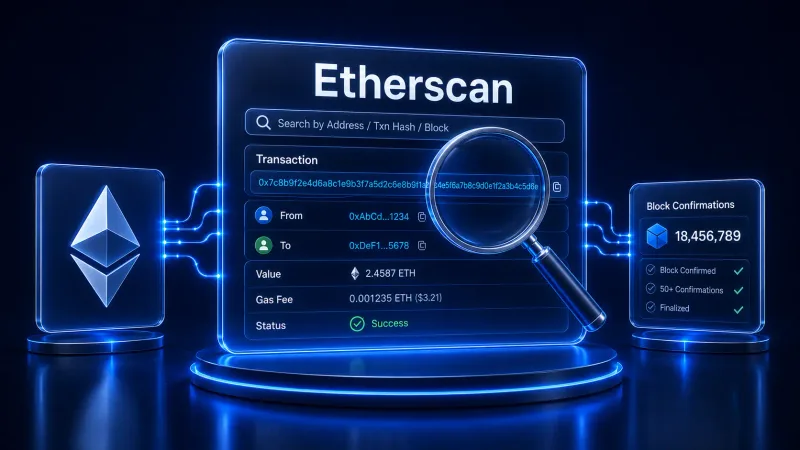
- Read the result. You'll see the sender and receiver addresses, the amount sent, the network fee paid, the timestamp, and the current status of the transaction.
Step 2: Searching a wallet address
Running a crypto address lookup follows the same pattern as a transaction lookup, just with an address instead of a hash.
- Copy the wallet address you want to check. Whether you check wallet address details for your own crypto wallet or someone else's public address, the steps are the same, since all addresses and balances on a public blockchain are visible to anyone.
- Paste the address into the same search bar on the matching chain's explorer.
- Review the address page. Most explorers show the current balance, a full list of past transactions in chronological order, and, for smart-contract chains, any tokens the address holds.
This is the same lookup you'd use to confirm a deposit landed in a wallet from MetaMask, Trust Wallet, or any other wallet, since the explorer reads directly from the chain rather than from any single wallet provider's records. If you're still deciding where to keep your coins in the first place, our guide to the best ways to store your crypto compares the main options.
Reading confirmations, gas fees, and transaction status
The result page for a transaction typically shows three things worth understanding:
- Status: searching a transaction hash reveals whether it's pending, confirmed, or failed. A pending transaction is still waiting to be included in a block; a confirmed one has been permanently recorded.
- Confirmations: each additional block mined after your transaction adds one confirmation, and more confirmations mean the transaction is less likely to ever be reversed.
- Network fee: called "gas" on Ethereum and simply a "fee" on Bitcoin, this is the amount paid to the network's validators or miners to process the transaction.
All three data points sit on the same results page, so you rarely need to look anywhere else to answer "did it go through?"
Popular Blockchain Explorers by Chain
Every chain has at least one dedicated explorer, and most of the well-known ones are free to search without creating an account.
Bitcoin
For Bitcoin, Mempool.space is the go-to explorer, describing itself as "our mempool and blockchain explorer for the Bitcoin community, focusing on the transaction fee market and multi-layer ecosystem." Blockchain.com's explorer is another widely used option covering Bitcoin alongside a few other assets.
Ethereum
For Ethereum and other EVM-compatible chains, Etherscan is the standard reference. Etherscan's own documentation describes it as "the leading blockchain explorer, search, API, and analytics platform for Ethereum and other EVM-compatible chains."
BNB Chain and Solana
BscScan is the BNB Chain equivalent of Etherscan, built on the same interface and search conventions. Solana has two commonly used options, Solscan and SolanaFM, both of which handle Solana's higher transaction throughput and its token program in addition to standard transfers.
Polygon, Arbitrum, Base, Avalanche, Tron, and other chains
Most newer networks and Ethereum layer-2s follow the Etherscan naming pattern: PolygonScan, Arbiscan, BaseScan, and Snowtrace for Avalanche. TronScan covers Tron. If you're new to any of these networks, our guide on adding Polygon to MetaMask covers the setup side of working across chains like these.
Multi-chain explorers
If you regularly move between chains, a multi-chain explorer such as Blockchair or OKLink can search several networks from a single interface, which saves you from bookmarking a dozen different chain-specific tools.
Manual checks don't scale to a full tax year
Verifying one transaction on an explorer is straightforward. Doing that for every trade across every wallet and exchange you used this year is not. CoinTracking automates that reconciliation once you're ready to move from spot-checking to a finished report.
Why Blockchain Explorers Matter for Crypto Tax Reporting & Verification
Every guide to blockchain explorers covers lookups and use cases. Almost none of them mention the reason a lot of crypto holders actually open one in the first place: verifying something for their taxes. A blockchain explorer is a public, timestamped record of every transaction you've ever made, which makes it one of the most useful tools available for crypto tax reporting, even though it wasn't built for that purpose.
Verifying transactions for cost-basis and gain/loss calculations
For U.S. tax purposes, digital assets are treated as property, not currency. The IRS requires you to report the transaction date, the number of units, and the cost basis for each asset sold in order to calculate a gain or loss. A blockchain explorer gives you the exact transaction date and amount straight from the chain, which is exactly the raw data that feeds into a cost-basis calculation. See our guide to crypto taxable events for a full breakdown of which transactions actually trigger a reportable gain or loss.
Cross-checking exchange and wallet import data
Exchange CSV exports occasionally have gaps, duplicate rows, or missing withdrawal records, especially for older or defunct platforms. When a number in your records looks off, a blockchain explorer is the fastest way to confirm what actually happened on-chain: paste the wallet address or transaction hash and compare the timestamp, amount, and counterparty against what your exchange or tax software shows. If checking addresses one at a time gets tedious, you can instead import your transactions from over 400 exchanges and wallets and let the software flag the mismatches for you.
This matters most at the exact moment a withdrawal leaves an exchange and lands in your own wallet. If the amount your exchange statement shows doesn't match the amount the explorer shows arriving at your address, you've likely found a fee, a delay, or an import error worth investigating before it throws off an entire tax report.
Proving source of funds and holding periods
Holding periods determine how a gain is taxed. If you hold the asset for more than one year before you dispose of it, your capital gain or loss is long-term, and holding it one year or less makes it short-term. Without a specific identification, the IRS defaults to FIFO, applied separately within each wallet or account. A block's timestamp on an explorer is a verifiable, public record of exactly when you acquired or moved a specific coin, which is the underlying evidence a FIFO cost-basis calculation depends on. This also matters when transferring crypto between your own wallets: our guide on whether wallet-to-wallet transfers are taxable covers why keeping a clear on-chain record of these moves matters even when no sale takes place.
The same on-chain trail supports what's often called a Source of Funds record: documentation that traces a specific holding back to where it originated. Financial institutions are expected to understand the nature of a customer's account activity as part of their compliance obligations under FinCEN's Customer Due Diligence Rule, and a bank or exchange asking where a large crypto-related deposit came from is a common trigger for this kind of documentation. An explorer lets you show the public, timestamped path a coin took, which is exactly the kind of evidence a Source of Funds report is built from.
Where explorers fall short for taxes
A blockchain explorer shows you raw, unlabeled data one transaction at a time. It doesn't know your cost basis, doesn't convert historical values into your local currency, and can't apply an accounting method like FIFO across hundreds of transactions spread over multiple wallets and exchanges.
Reconstructing a full tax report by hand from explorer lookups alone, transaction by transaction, quickly becomes impractical once you have more than a handful of trades. It also won't walk you through the harder cases, such as knowing how to report crypto losses correctly, and if you'd rather not tackle any of the reconciliation yourself, CoinTracking Full Service can prepare the whole report for you.
Let software do the reconciliation
CoinTracking automatically matches your on-chain activity with your exchange history and calculates gains, losses, and holding periods for you.
Limitations and Risks of Using a Blockchain Explorer
An explorer's biggest strength, showing everything in the open, comes with real trade-offs. Two are worth understanding before you rely on one for anything sensitive: how much of your own activity becomes visible to others, and how complete the data you're looking at actually is.
Privacy and address de-anonymization
The same transparency that makes an explorer useful for verification also creates a privacy trade-off. As Chainlink puts it, "because all transaction data is public, anyone can view a wallet's entire financial history, current balance, and counterparties," and while "wallet addresses are pseudonymous, advanced forensic techniques can often link these addresses to real-world identities." Treat any address you've used publicly, on social media, in an invoice, or on a public donation page, as no longer fully private.
Multi-chain blind spots and explorer downtime
No single explorer indexes every chain, and a lookup that works perfectly on Ethereum tells you nothing about an address's activity on Solana or Polygon. Explorers can also fall behind during periods of network congestion, showing a transaction as unconfirmed for longer than usual simply because the indexer hasn't caught up yet, not because anything is wrong with the transaction itself. If a lookup looks stale, it's worth trying a second explorer for the same chain before assuming something failed.
Conclusion
A blockchain explorer is the simplest way to verify what actually happened on a blockchain: paste a transaction hash or wallet address, and you get the real, timestamped record straight from the network. That makes it a genuinely useful free tool for spot-checking transfers and, less obviously, for supporting your crypto tax records. What it won't do is turn hundreds of scattered transactions into a finished tax report; for that, you still need software that can import, reconcile, and calculate across every wallet and exchange you use, which is exactly where CoinTracking picks up where the explorer leaves off.
From on-chain data to a finished tax report
CoinTracking has tracked crypto portfolios and calculated taxes for over 2.2 million users since 2012, across more than 400 exchanges and wallets.
Disclaimer
The information provided in this article is intended for general informational purposes only and should not be construed as financial, tax, or legal advice. Blockchain explorer interfaces and features change over time, and specific tax treatment of crypto transactions depends on your jurisdiction and individual circumstances. Readers are encouraged to conduct their own research and consult with a qualified tax professional before making decisions based on the information presented here. The author and publisher are not responsible for any losses or damages incurred as a result of using the information in this article.